Stockity Demo Account
Open a free demo account on the Stockity platform using the buttons below and start trading without risk.
What is Stockity Demo Account and Its Benefits

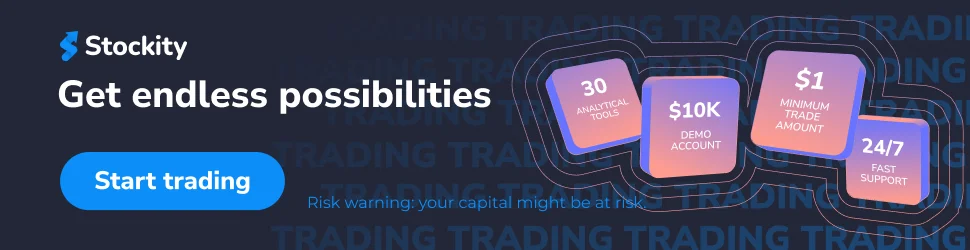
The Stockity demo account functions as a risk-free training ground where users can practice trading using virtual funds instead of real money. Unlike some platforms that limit demo access, Stockity provides a full-featured practice account with $10,000 in virtual currency upon registration – no deposit required. This virtual balance lets traders explore the platform, test strategies, and gain confidence before committing actual capital.
Demo trading delivers multiple advantages beyond just practice. New traders can learn platform navigation, understand market movements, and experiment with different assets without financial pressure. For experienced traders, the demo environment serves as a testing laboratory for new strategies or indicators before applying them to live markets.
Demo Account vs. Real Account: Key Differences
While Stockity’s demo closely replicates real trading conditions, several important distinctions exist:
| Feature | Demo Account | Real Account |
| Funds | Virtual $10,000 | Real money (min deposit $10) |
| Risk | No financial risk | Actual financial exposure |
| Psychology | Less emotional pressure | Real psychological challenges |
| Execution | May have slightly idealized fills | Subject to actual market conditions |
| Features | All basic tools and indicators | Full feature set including withdrawals |
| Reset Option | Can be refreshed if depleted | Requires new deposits |
The most significant difference lies in trading psychology. Without real money at stake, traders often take larger risks or ignore proper money management – habits that can prove costly in live trading. Understanding this psychological gap is crucial when transitioning from demo to real accounts.
Who Should Use a Demo Account?
Demo accounts benefit various trader profiles:
- Beginners learning trading fundamentals and platform mechanics
- Intermediate traders testing new strategies or technical indicators
- Experienced traders adapting to a new platform or market segment
- Returning traders rebuilding skills after a break
- Risk-averse individuals determining if trading suits their personality
Even professional traders regularly use demo accounts to prototype strategies without financial risk. The key is using demo trading purposefully rather than as an indefinite substitute for real trading.
How to Open a Stockity Demo Account
Getting started with Stockity’s demo account involves a straightforward registration process that takes just minutes to complete. The platform has streamlined account creation to provide quick access to practice trading without unnecessary complexity.
Step 1: Registration Process
- Visit the official Stockity website or download the mobile app
- Click the “Register” button (Or click on our button below)
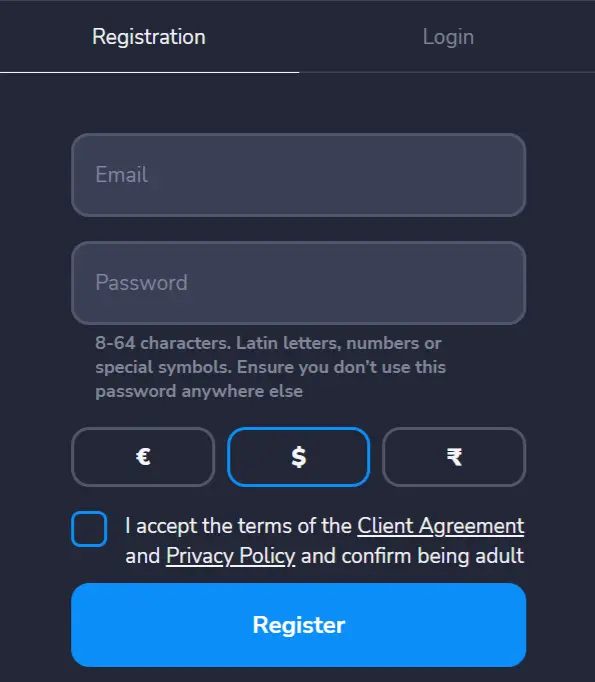
- Complete the registration form with your email address
- Create a secure password and select your account currency preference
- Verify your email address through the confirmation link
Once registered, you automatically receive access to the demo account with $10,000 in virtual funds. No personal documents or verification are required at this stage – those steps only become necessary when you decide to deposit real money and activate a live trading account.
Navigating Between Demo and Real Mode
Switching between demo and real trading modes on Stockity is intuitive:
On Desktop/Web Platform:
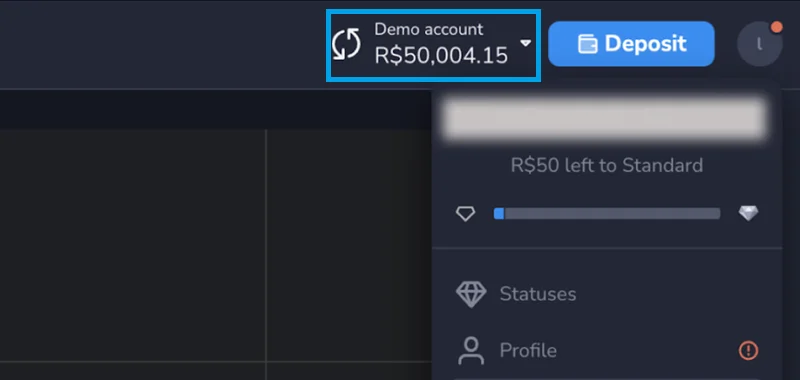
- Look for the balance indicator in the top right corner of your screen
- Click on the balance display to open the account menu
- Select “Switch to Demo” or “Switch to Real Account” as needed
On Mobile App:
- Tap your balance displayed at the top of the screen
- Choose “Switch Account” from the dropdown menu
- Select your preferred account type (Demo or Real)
This seamless transition capability allows traders to practice strategies in demo mode, then implement them in real trading without leaving the platform. If you deplete your virtual funds through practice trading, contact Stockity’s support team, who can reset your demo balance – a service many traders appreciate during extended learning periods.
Trading on Stockity Demo: Platform Features and Tools
The Stockity demo environment provides full access to the platform’s trading tools and features, creating an authentic practice experience. This comprehensive setup enables traders to master the platform before risking real capital.
The interface follows a clean, modern design focused on usability. The main chart occupies the central screen area, with trading panels positioned to the right for order placement. Asset selection and timeframe controls appear above the chart, while analytical tools and indicators are accessible via toolbar buttons.
Technical Analysis Indicators and Drawing Tools
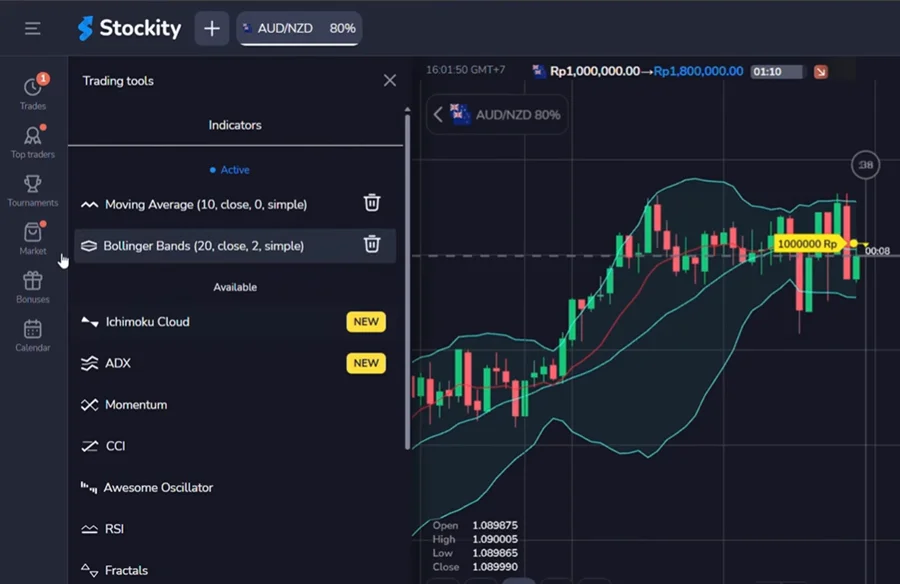
Stockity’s demo account includes approximately 30 analytical tools to support informed trading decisions:
Popular Technical Indicators:
- Moving Averages (Simple, Exponential, Weighted)
- Relative Strength Index (RSI)
- Moving Average Convergence Divergence (MACD)
- Bollinger Bands
- Stochastic Oscillator
- Fibonacci Retracement
- Ichimoku Cloud
Drawing Tools:
- Trend lines
- Horizontal/vertical lines
- Channels
- Support/resistance zones
- Text annotations
- Shapes for pattern identification
These tools function identically to their real account counterparts, allowing traders to develop and test technical analysis skills without limitations. The platform saves custom indicator settings between sessions, creating consistency in your analysis approach.
Chart Types and Timeframes
Stockity offers versatile charting options to accommodate different trading styles:
Chart Types:
- Candlestick charts (most popular for pattern recognition)
- Line charts (simplified price movement visualization)
- Bar charts (OHLC price representation)
- Mountain charts (for area visualization)
Available Timeframes:
- Ultra-short: 1 second (for 5-second trades), 5 seconds, 15 seconds, 30 seconds
- Short-term: 1 minute, 5 minutes, 15 minutes, 30 minutes
- Medium-term: 1 hour
Available Assets and Trading Conditions in Demo Mode
Stockity’s demo mode provides access to a diverse selection of trading instruments, closely mirroring what’s available in real accounts. This comprehensive asset range allows traders to practice across different markets and develop specialized strategies for specific instruments.
The exact number of available assets depends on account status, with 32 instruments accessible in demo mode. While this represents fewer assets than the full 70+ available to high-tier real accounts, it covers all major market categories and provides ample practice opportunities.
Available Asset Categories
Currency Pairs:
- Major pairs: EUR/USD, GBP/USD, USD/JPY, AUD/USD
- Minor pairs: EUR/GBP, GBP/JPY, EUR/CAD
- Exotic pairs: USD/TRY, EUR/NOK, USD/ZAR
Commodities:
- Precious metals: Gold (XAU/USD), Silver (XAG/USD)
- Energy: Crude Oil (WTI), Natural Gas
- Agricultural: Coffee, Sugar, Corn (availability varies)
Stock Indices:
- US markets: S&P 500, NASDAQ, Dow Jones
- European markets: DAX (Germany), FTSE (UK)
- Asian markets: Nikkei 225 (Japan)
Trading conditions in demo mode closely match real account parameters. Expiration times range from ultra-fast 5-second options to longer 60-minute durations. This variety lets traders test strategies across different timeframes – from quick scalping to more deliberate position trading.
The minimum trade amount in demo mode is $1 (same as real accounts), teaching proper position sizing from the start. Payout rates also mirror live trading, typically ranging from 80-95% for successful trades depending on the asset and market conditions.
Developing an Effective Trading Strategy with Demo Account
The primary value of Stockity’s demo account lies in its potential as a strategy development laboratory. Without financial risk, traders can methodically test approaches, refine techniques, and analyze outcomes to build trading systems that work for their style and goals.
Effective strategy development requires structure rather than random trading. Start by defining clear trading objectives – whether focusing on specific assets, timeframes, or technical patterns. Document your trading rules precisely, including entry criteria, exit conditions, and position sizing guidelines.
Risk Management Techniques to Practice
Risk management separates successful traders from those who eventually deplete their accounts. The demo environment provides an ideal space to master these critical skills.
Key Risk Management Approaches:
- Position Sizing – Never risk more than 1-3% of your account on a single trade
- Stop-Loss Placement – Determine maximum acceptable loss before entering positions
- Risk-Reward Ratios – Aim for trades with potential rewards 2-3 times greater than risk
- Correlation Management – Avoid multiple positions in highly correlated assets
- Drawdown Limits – Set maximum daily/weekly loss thresholds to trigger trading pauses
Create a risk management template within your demo trading that you’ll maintain when transitioning to real funds. This builds proper habits before actual money is at stake.
Tracking Performance and Analyzing Results
Trading without performance tracking is like driving blindfolded. Establish a detailed trading journal during your demo period:
| Trading Metric | What to Track | Why It Matters |
| Win Rate | Percentage of profitable trades | Indicates strategy accuracy |
| Average Win/Loss | Size of typical gains vs. losses | Shows strategy efficiency |
| Maximum Drawdown | Largest account decline | Tests psychological resilience |
| Profit Factor | Gross profits divided by gross losses | Measures overall profitability |
| Expectancy | Average amount earned per trade | Reveals long-term earning potential |
Many traders use spreadsheets to track these metrics, but even a simple notebook works. The crucial aspect is consistent recording and regular review of results to identify patterns and improvement opportunities.
Most importantly, approach demo trading with the same discipline and focus you would use with real funds. This mental preparation creates a smoother transition when you begin live trading.
Making the Most of Your Stockity Demo Experience
To extract maximum value from your Stockity demo account, approach it with purpose and structure. Set specific learning objectives rather than trading randomly – for example, mastering a particular indicator, testing a specific strategy, or improving trade timing.
Treat demo trading as a professional development activity rather than a game. Allocate dedicated practice time, free from distractions, and focus on quality over quantity. Fifteen focused trades with thorough analysis provide more learning value than fifty random positions.
Educational Resources and Support
Stockity offers complementary educational materials to enhance your demo trading experience:
Learning Resources:
- Trading tutorials integrated into the platform
- Strategy guides for different market conditions
- Technical analysis explainers for indicators
- Risk management frameworks
- FAQ section addressing common questions
The platform’s 24/7 support team can also assist with technical questions about platform features, indicator functions, or account settings. This support creates a more guided learning experience than simply practicing in isolation.
FAQ About Stockity Demo Account
Can I reset my demo account if I lose the virtual funds?
Yes, if you deplete your demo balance, contact Stockity’s support team, who can reset your virtual funds to continue practicing.
Does the demo account show real market prices?
Yes, Stockity’s demo terminal uses real-time market data identical to the live trading environment, ensuring authentic practice conditions.
Can I switch between demo and real accounts without logging out?
Yes, Stockity allows seamless switching between demo and real accounts through the account selection menu without logging out of the platform.
Do I need to verify my identity to use the demo account?
No, identity verification is not required for demo account access. Verification only becomes necessary when you’re ready to deposit funds and begin real trading.
How similar are trading conditions between demo and real accounts?
Trading conditions are nearly identical, including available assets, expiration times, and payout rates. The primary difference is the use of virtual funds instead of real money.
Sign Up and Get a Welcome Bonus
Sign up now and get a bonus on your first deposit! Any doubts? Then just test the platform on a free demo account.
* Risk Warning: Online trading may involve significant financial risks including the risk of losing all funds on your trading account. Please, estimate all the risks and get advice from an independent financial advisor before using Stockity services. We also recommend not to invest funds you can’t afford.